Google Ads5 min read
Automate Google Ads UTM Tracking with Campaign and Ad Group Names
May 22, 2026
Stop manually building UTM links in spreadsheets. UTM Mind's AI agent creates templates, generates links, enforces naming conventions, and syncs tracking parameters to every ad platform — all from a single conversation.
Marketing teams save 20+ hours per week. Zero broken UTMs. Perfect data, automatically.

Product Tour
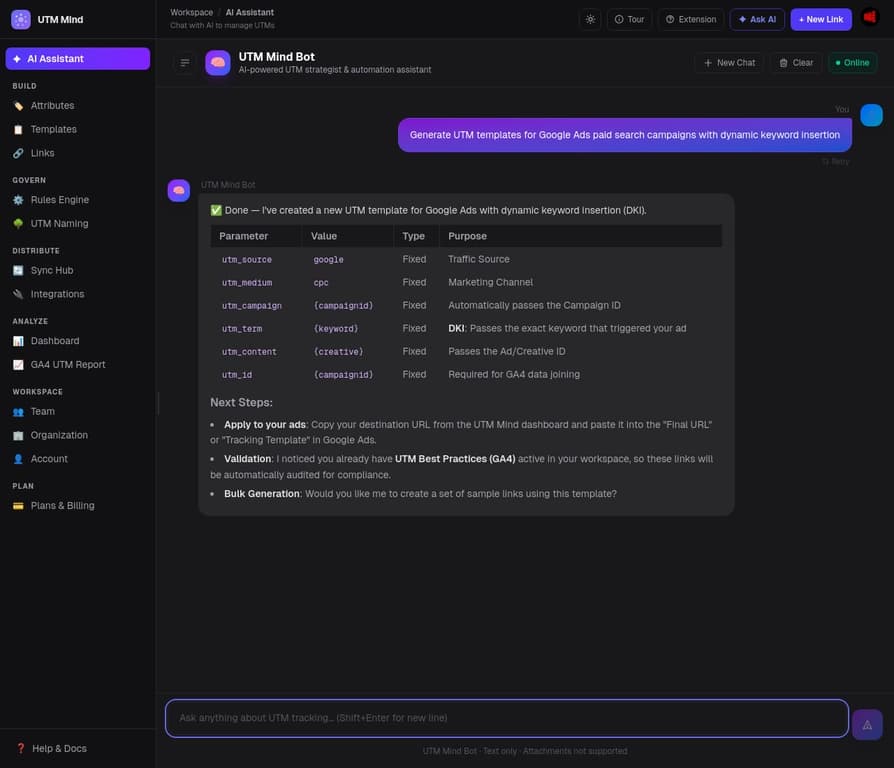
Real screenshots from the UTM Mind dashboard — this is exactly what your team will use every day.
Tell the AI agent to create templates, generate links, set up validation rules, or sync to ad platforms — all in plain English. No clicking through menus.
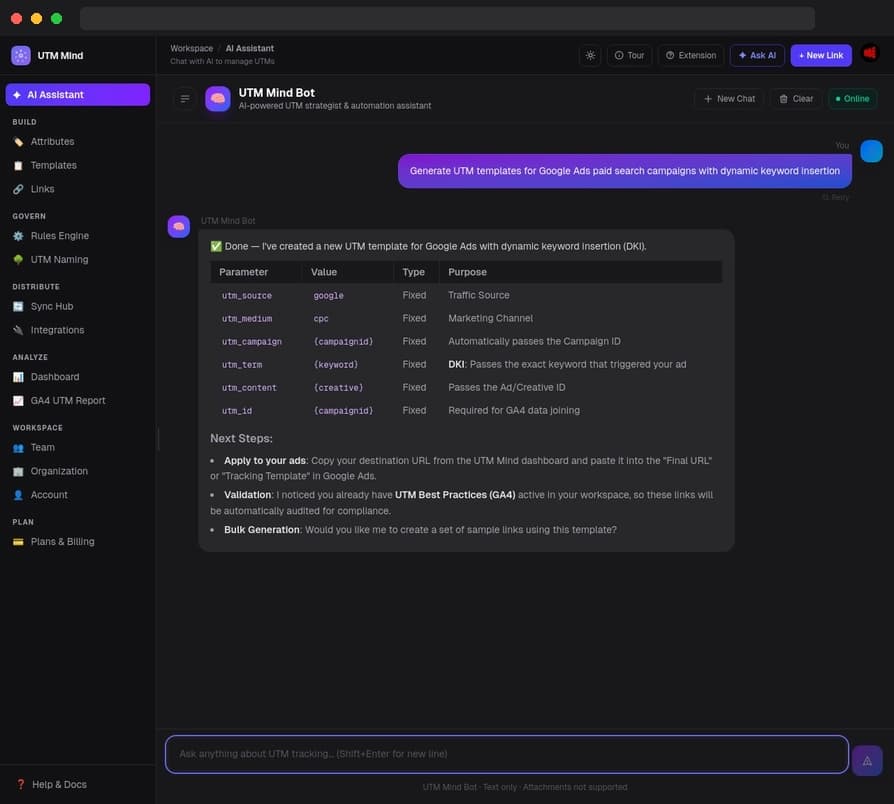
Most teams waste hours every week on UTM tasks that should take minutes — building templates, checking GA4, updating ad platform tracking. The UTM Mind AI agent does all of it in a single conversation.
Ask it to audit your live GA4 data and fix broken parameters. Tell it to sync tracking templates to all your Google Ads accounts. Have it generate and validate a full campaign link set in seconds. It understands your naming convention and acts on it immediately.
Sound Familiar?
Manual UTM processes, inconsistent naming, and zero verification mean your attribution data is probably wrong right now — costing you real budget decisions based on bad numbers.
One team writes utm_source=google. Another writes utm_source=Google_Ads. GA4 treats them as two separate channels — splitting your campaign data, inflating some sources, and burying others. Your ROAS reports are wrong before you even open them.
UTM Mind enforces a shared naming convention through attributes and templates. Every link follows the same rules — automatically — so your GA4 data reflects reality.
Pasting tracking templates into Google Ads or Meta campaign settings is slow, error-prone, and silently broken. A single typo in a tracking URL means weeks of campaigns running with no attribution data — and you only find out when the report looks wrong.
UTM Mind connects directly to your ad platforms via OAuth and syncs the correct tracking template with one click — including {lpurl} for Google Ads ValueTrack parameters. No copy-paste, no broken URLs.
Links get generated, campaigns go live, and nobody checks whether the UTM data is flowing into GA4 correctly. Then the quarterly report arrives and you discover three months of broken attribution. By then, the ad spend is gone.
UTM Mind pulls live GA4 data and surfaces attribution quality reports. Catch broken parameters, missing sources, and naming anomalies in real time — before they compound into a reporting disaster.
How It Works
UTM Mind covers the full lifecycle: define your standards, generate compliant links, sync to your ad platforms, and verify the data is clean in GA4. One platform, zero manual steps.
Set up the allowed values for every UTM field — sources, mediums, campaigns, content. Build channel-specific templates that encode your naming rules. From this point on, no one on your team can generate a non-compliant link.
Result: a single source of truth for UTM naming that every link is measured against.
Build individual or bulk UTM links from your templates. Every link is validated against your convention before it leaves the platform. Export directly to Google Sheets so your team always has the right links — never a stale spreadsheet.
Result: zero broken links reach your campaigns. Every URL is clean before it goes live.
Push your UTM tracking templates directly to Google Ads and Meta with one click — no manual copy-paste. Then pull live GA4 data to verify your attribution is flowing correctly. Catch issues in real time, not at the end of the quarter.
Result: your ad platforms and analytics always stay in sync. Attribution gaps surface immediately.
21+ Integrated Features
UTM Mind replaces spreadsheets, manual copy-paste, and tribal knowledge with a structured, AI-assisted governance system. Build consistent links, enforce naming rules, sync to ad platforms, and verify data quality in GA4 — all in one place, all accessible through the AI agent.
Stop navigating menus to do things that should take one sentence. The AI agent creates templates, generates bulk links, sets up validation rules, syncs to ad platforms, and audits your GA4 data — all from a single conversation. Tell it what you need; it handles the rest.
Know whether your attribution is actually working — before the quarterly report tells you it isn't. Connect GA4 and the AI automatically audits your live campaign data, surfaces broken parameters and naming inconsistencies, and suggests fixes you can apply in seconds.
Define your naming convention once and enforce it everywhere. Build reusable channel templates that lock in the correct values for every UTM field. Start in minutes with a built-in preset library for Google Ads, Meta, TikTok, Email, and more — or build your own from scratch.
Your agency or media partner doesn't need an account to follow your naming convention. Turn any template into a shareable link builder with one click — they fill in the fields and generate correctly formatted UTM links. Every link they create syncs back to your dashboard automatically.
Generate dozens of validated UTM links in seconds — not hours. The grid-mode builder lets you create links across multiple URLs, sources, and mediums simultaneously. Every link is validated before it leaves the platform. Manage, filter, and export your entire link library from one place.
Make it impossible to create a non-compliant UTM link. Define custom validation rules — allowlists, blocklists, regex patterns, max-length limits — that every link must pass before it can be used. Start instantly with a built-in preset library, or build your own.
Maintain a single approved list of UTM values for every parameter — sources, mediums, campaigns, content. When every team member picks from the same list, your GA4 data stays clean. Preset libraries for all standard fields are included, with platform macros for Google Ads, Meta, and TikTok.
Give your team a living reference they'll actually use. Visualize your entire UTM naming convention as an interactive tree diagram — auto-generated from your templates and attributes. Share it as a team document so everyone builds links the same way, every time.
Eliminate the copy-paste step that breaks Google Ads tracking. Sync UTM tracking templates directly to your campaigns with one click via OAuth. Supports {lpurl} and all Google ValueTrack parameters — so your tracking survives landing page changes automatically.
Stop manually entering UTM parameters in Meta Ads Manager. Connect Meta via OAuth and push your UTM parameters to Facebook and Instagram campaigns automatically. Supports Meta dynamic parameters — ensuring consistent attribution across every placement and ad format.
See exactly which campaigns are driving conversions — and which UTM parameters are breaking your data. Connect GA4 via OAuth to pull live attribution data directly into UTM Mind. View source/medium performance, validate parameter consistency, and spot gaps without exporting a single CSV.
Sync UTM URL suffixes directly to DV360 line items via OAuth. Navigate the full Partner → Advertiser → Campaign → Insertion Order → Line Item hierarchy, select multiple line items, and push your tracking parameters in one operation — with before/after preview.
Sync URL suffixes to CM360 campaigns and placements via OAuth. Traverse the Account → Advertiser → Campaign → Placement hierarchy, apply CM360 macros like %ebuy! and %epid!, and update tracking parameters across your entire display and video buy in seconds.
Sync UTM landing page URLs to TikTok Ads via OAuth. Navigate the Advertiser → Campaign → Ad Group → Ad hierarchy, select at any level, and push your tracking URLs automatically. Supports all TikTok macro variables including __CAMPAIGN_NAME__, __AID_NAME__, and __CID_NAME__.
Migrate your existing UTM links in minutes — not days. Import from CSV or Google Sheets with flexible column mapping. Export your entire link history, templates, and attribution reports with one click for stakeholder reporting or offline analysis.
When a campaign tracking issue surfaces, you need to know who changed what and when. Every link creation, template update, and rule change is logged with a timestamp and author — giving you a full audit trail for debugging, compliance, and team accountability.
Attribution consistency breaks down when every team member builds links differently. Invite your entire marketing team to a shared workspace — everyone works from the same templates, attributes, and naming conventions. Agencies on the Scale plan can create and manage up to 10 separate client organizations, each with its own isolated team, links, and UTM governance — and switch between them instantly from the dashboard.
Turn any UTM link into a scannable QR code in seconds — no extra tools required. Generate branded QR codes directly from your link library or the link builder, customize colors and size, and download as PNG or SVG for print, digital, or out-of-home campaigns.
Integrate UTM Mind into any existing workflow with a comprehensive REST API. Generate links, validate URLs, manage templates and rules, and control your entire UTM governance layer programmatically — all secured with scoped API keys and subject to your plan limits.
Give your AI agent native UTM superpowers. UTM Mind ships a Model Context Protocol (MCP) Server that lets AI assistants like Manus, Claude, and Cursor discover and call UTM tools directly — no custom API client code required. Embed UTM governance into any agentic workflow in minutes.
All features, every plan
Every plan includes the AI agent, validation rules, ad platform integrations, and GA4 reporting. You get the full platform from day one — upgrade only when you need more links or team members.
Get started for freeResources
UTM tracking guides, platform deep-dives, and attribution best practices from our team.
Google Marketing Live 2026 announced Meridian for Google Analytics 360. Learn what Meridian and MMM mean, why marketers need causal measurement, and why clean UTM management is the foundation.
Looking for the best way to manage your campaign links? We compare the top UTM tools of 2026 and dive deep into why UTM Mind has become the industry leader for modern marketing workflows.
FAQ
Everything you need to know about UTM link management and the UTM Mind platform.
Start Today — Free
When your UTM data is clean, you can make confident budget decisions, prove campaign ROI, and stop second-guessing every GA4 report.
UTM Mind gives you consistent naming conventions, validated links, automated ad platform sync, and live GA4 data quality verification — all in one governance platform. Start free in under 5 minutes.
Free plan includes all core features. No credit card required.